



Link stats are part of VIP.
See who viewed your link
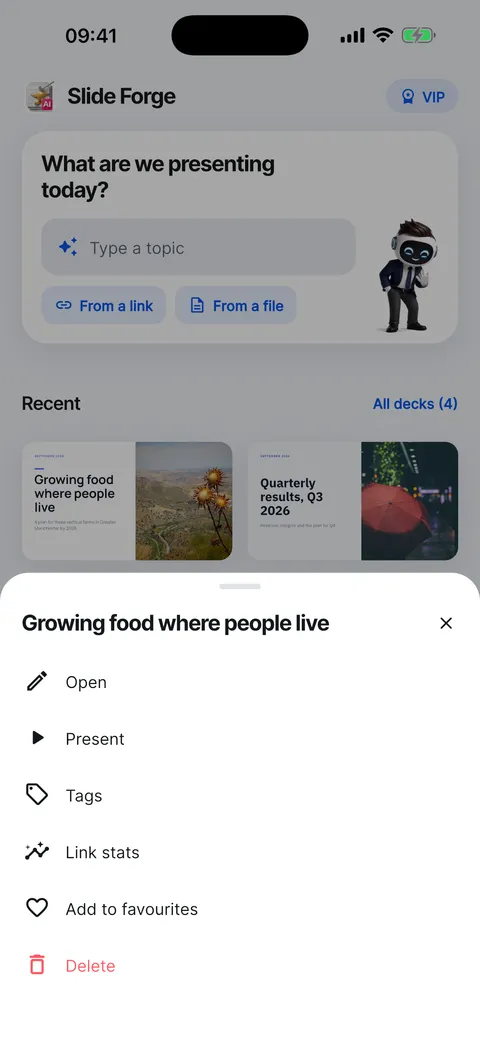
Open Link stats from a deck’s … menu or Who viewed it on the Export sheet. It shows views, people, average time, how many saw it all and the time spent on each slide.
Steps
Make a web link first: Export, then Web link.
On Home or Decks, tap … on the deck and choose Link stats.

Read the four numbers at the top: Views, People, Avg. time and Saw it all. Time on each slide shows where people slowed down.
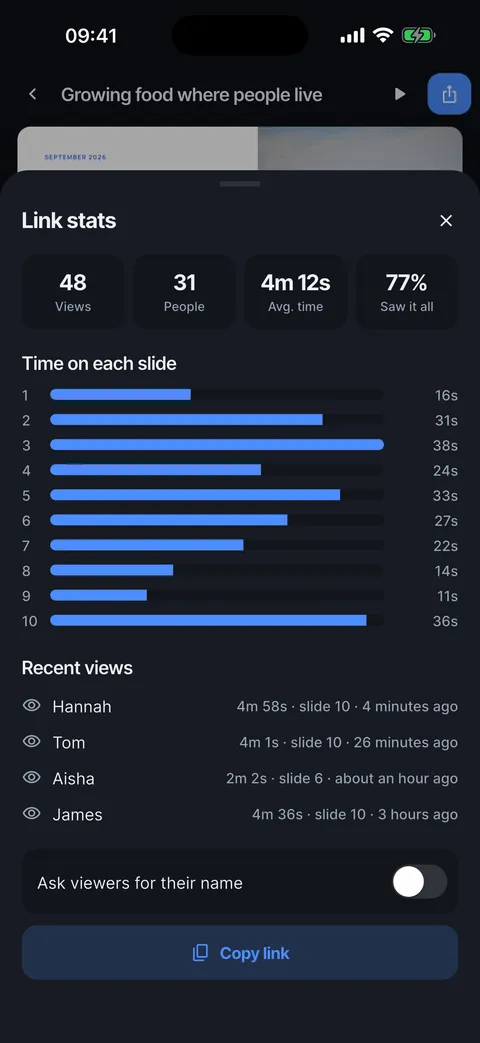
Recent views lists each visit with how long it lasted, the furthest slide reached and when.
Turn on Ask viewers for their name to see names instead of Someone.
See who viewed your link
Views, people, time on each slide and recent visits.


- On Home, tap … on the deck.
- Choose Link stats.
- Views, people, average time and how many saw it all.
- Time on each slide shows where people slowed down.
- Recent views: how long, how far and when.
- Ask viewers for their name to see who they are.
Checked on Slide Forge 2.0.0
Was this helpful?
Thank you. That helps us keep the answers right.
Thank you. Tell us what was missing and we will fix the article.Write to support